> ## Documentation Index
> Fetch the complete documentation index at: https://docs.agentcat.com/llms.txt
> Use this file to discover all available pages before exploring further.
# Report Missing Tools
> See what functionality users need but can't find on your MCP server.
When an AI agent can't find the right tool on your server, the user hits a dead end and you never hear about it. Report missing tools closes that feedback loop. AgentCat gives the agent a way to flag what it was looking for, so you can see exactly which capabilities are missing and how often users need them.
This feature is enabled by default — no configuration needed.
## What You'll See
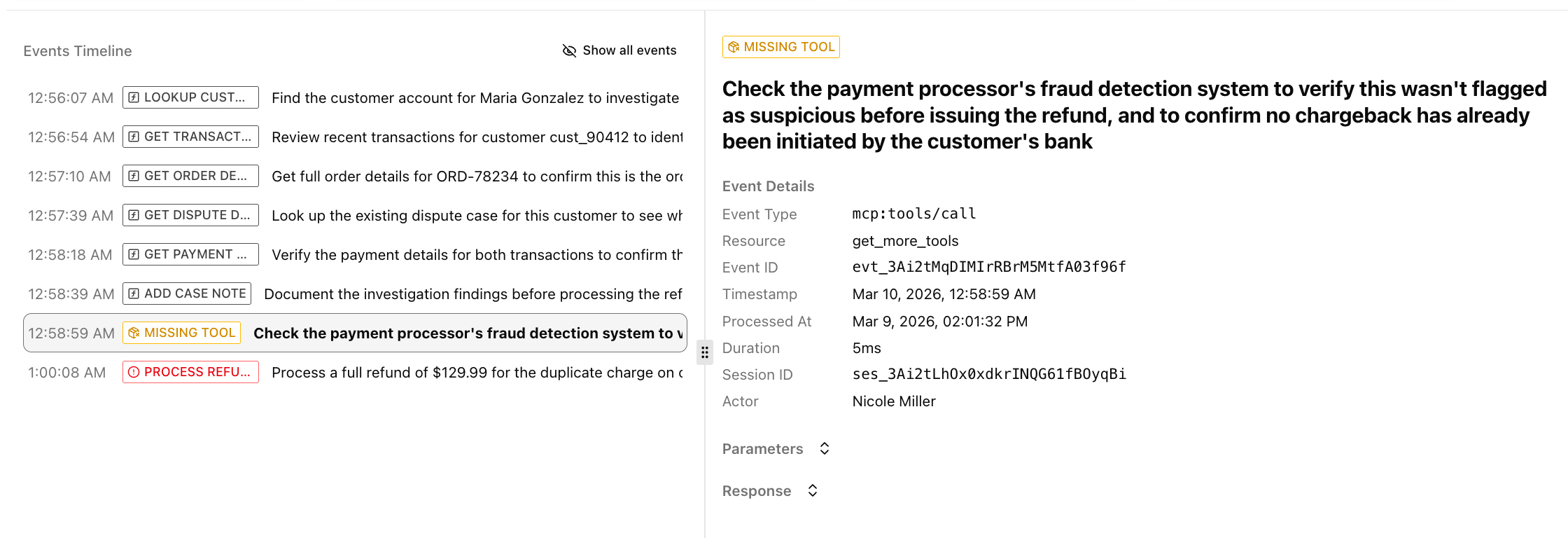 Missing tool requests show up in two places:
**Sessions list** — The **Issues** column flags sessions where clients reported missing tools, alongside any errors. This gives you a quick sense of how often users are hitting gaps.
**Session Replay** — Missing tool events appear in the timeline with a warning badge. Click one to see what the client was looking for and the context behind the request. This is where you'll find the detail you need to decide what to build next.
## Disabling the Feature
If you don't want AgentCat to add the `get_more_tools` tool to your server, disable it:
```typescript TypeScript theme={null}
agentcat.track(mcpServer, "proj_abc123xyz", {
enableReportMissing: false
})
```
```python Python theme={null}
agentcat.track(server, "proj_abc123xyz",
agentcat.AgentCatOptions(enable_report_missing=False))
```
```go Go theme={null}
mcpcat.Track(s, "proj_abc123xyz", &mcpcat.Options{
DisableReportMissing: true,
})
```
Missing tool requests show up in two places:
**Sessions list** — The **Issues** column flags sessions where clients reported missing tools, alongside any errors. This gives you a quick sense of how often users are hitting gaps.
**Session Replay** — Missing tool events appear in the timeline with a warning badge. Click one to see what the client was looking for and the context behind the request. This is where you'll find the detail you need to decide what to build next.
## Disabling the Feature
If you don't want AgentCat to add the `get_more_tools` tool to your server, disable it:
```typescript TypeScript theme={null}
agentcat.track(mcpServer, "proj_abc123xyz", {
enableReportMissing: false
})
```
```python Python theme={null}
agentcat.track(server, "proj_abc123xyz",
agentcat.AgentCatOptions(enable_report_missing=False))
```
```go Go theme={null}
mcpcat.Track(s, "proj_abc123xyz", &mcpcat.Options{
DisableReportMissing: true,
})
```